AI-generated websites
Move HTML created with AI coding tools into Builderall for editing, publishing, and management.
Upload your HTML or ZIP file. Builderall AI analyzes it, turns it into an editable Website Builder project, and helps you move from finished code to a published website.
Upload your website to get started
Drop a .zip, .html or .htm file here, up to 10MB. Builderall AI turns it into an editable Website Builder project.
Bring an existing HTML website into Builderall without recreating every section from a blank page.
Once processed, the imported website can be opened in Builderall for the edits supported by the visual editor.
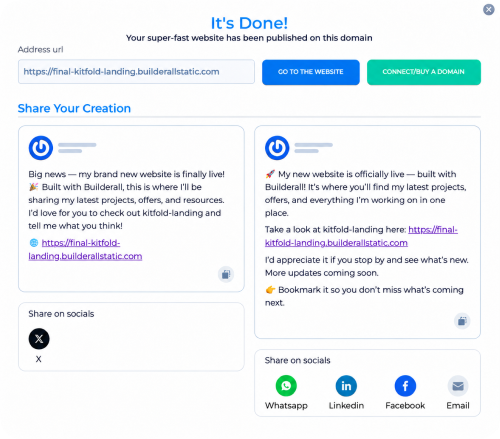
Publish to a Builderall address, visit the live website, connect or buy a domain, and share the launch across key channels.

Drag & drop your HTML or .zip file here
or

The real benefit is not simply uploading a file. It is turning that file into a Builderall project that can be edited, published, connected to a domain, and managed alongside the rest of the platform.
Publish to a live address, connect or register a domain, and prepare to share your website. That completion moment deserves its own section because it turns a technical upload into a visible business outcome.

Bring a website you created with AI, a custom HTML project, or an existing static site.
Move HTML created with AI coding tools into Builderall for editing, publishing, and management.
Import a website developed by you, your team, or a professional developer.
Turn campaign pages, exported prototypes, and standalone HTML projects into live websites.
Upload HTML or ZIP files up to 100 MB.
Yes. Continue editing your imported site in Builderall. Some code changes may require updating your original files and uploading them again.
Include your images and other required files, responsive layouts, page titles, and SEO details. Check that the website works before uploading.
Yes. Publish to a Builderall website address, then connect an existing domain or register one.
Upload your files, continue editing in Builderall, and publish when the result is ready.
Upload my HTMLYour uploaded site is waiting for an account.
Already have an account? Type that account’s email in the Email field above, then press Continue. Your site is attached to that email.